
Click Image to Enlarge
⇄
Click Here to Switch Between Render & Physical Device
Movibus Model A100.0
Description
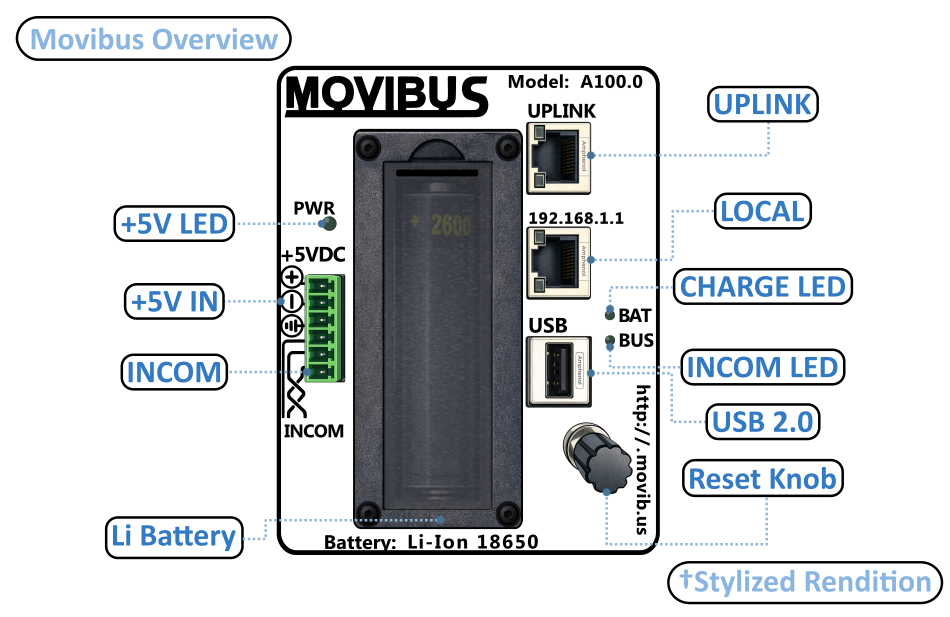
+5V LED:
Indicates Movibus is getting power from an external 5V power supply.
+5V IN:
The top 3 pins in the Phoenix connector, where external power connects.
INCOM:
The bottom 3 pins in the Phoenix connector, where the INCOM twisted pair and shield connect.
Li BATTERY:
Movibus can run off a backup battery in case of power loss or use as a field tool for troubleshooting INCOM issues. The battery is the 18650 form factor and is replaceable.
RESET KNOB:
This knob enables the user to perform the following functions by turning the knob in certain combinations and pressing:
- System reboot
- Configuration reset
USB 2.0:
Allows for connection of jump drive, RS-485 adapter or any other supported USB peripheral.
INCOM LED:
Indication of INCOM activity.
- Off: No INCOM activity
- Blinking: Movibus is transmitting but no devices are responding
- Solid: Movibus is receiving data
CHARGE LED:
Indication of battery charge activity.
- Off: No battery installed or disconnect button is pushed
- Blinking: Battery is charging
- Solid: Battery is charged or running off battery
LOCAL:
Ethernet port for local maintenance access. Always at 192.168.1.1.
UPLINK:
Ethernet port to use for connecting to host network.
Note: Battery disconnect and INCOM termination resistor enable buttons are on the side of the unit, above the MOVIBUS logo.
Software Functionality
Passive INCOM Interface
- Listen and capture INCOM traffic on existing legacy system to learn the device list and what data parameters are being polled
- Troubleshoot INCOM communication issues
Active INCOM Interface
- Perform regular data polling operations for real time data feeds
- Autolearn devices on network by scanning INCOM address space
- Retrieve trip buffers and other event data
Remote Storage Support
- Push system logs, backup configurations to System shared drive
- Push trip buffers and other power data logs to a User data shared drive
- Protocols include SFTP, SCP and SMB
Device Support
Support INCOM devices communicating at 9600 baud:
- Metering products (IL-17384B)
- Trip units (IL-17384C)
- BIM/AEM (IL-17384 E)
- DIM (IL-17384 F)
SCADA Support
- Modbus-TCP: Support configuring modbus maps to INCOM data, as well as slave addresses
- DNP3: Support for building DNP3 point maps and transmitting event data is also possible
Web Interface Based Configuration
- Application (INCOM, Modbus, etc) is achieved through custom web pages
- System configuration is via OpenWRT LUCI web pages
Hardware Description
Power Consumption
- 5V external power supply
- < 2W power consumption when charging battery and no external USB device attached
- Battery runtime is approximately 6 hrs, depending on system load
Lithium Battery
- Removable via front cover
- Unit stays powered when Phoenix connector is removed for INCOM rewiring
- Battery power allows use as diagnostic tool in field
Enclosure
- Fully enclosed metal enclosure
- No ventilation required to cool the system
- No moving parts in the device
Additional Features
- Dual 10/100 ethernet ports allow configuration/troubleshooting while device is deployed in the field
- USB port allows external communication interfaces such as RS-485 for future functionality expansion
- Button for battery disconnect allows easy disconnect from the backup battery for storage or shipping purposes
- Button for termination resistor eliminates need for external resistor and streamlines procedure for passive listening to being an active master
- Encoder knob prevents accidental reset or other function. Twist based method requires a deliberate procedure to issue a reset or other system function
- INCOM LED indicator allows quick check to make sure that INCOM communications are functional
- Battery LED shows status of battery and alerts user if unit is running on battery power